

For vendors/How you earn
How you earn
Listing is free. When a guest books and pays, the platform keeps a small commission and the rest is yours.
4 steps · 2 min read
Preview with sample data · tap a number
Step 1: Open your Overview
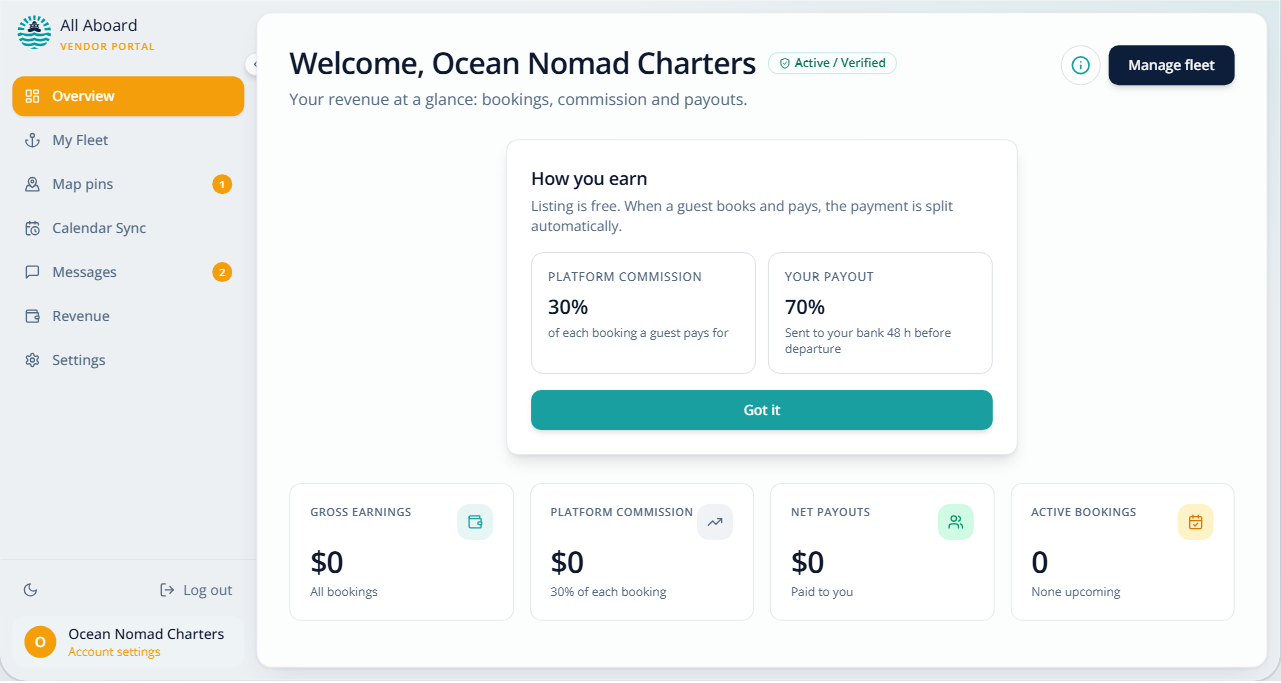
Once you're approved, Overview shows your verification status and your earnings.
Step 2: Open How you earn
Tap the info button next to Manage fleet. It opens by itself the first time you visit, and anytime after that you can tap it.
Step 3: Know your commission rate
Guests pay All Aboard. Each payment splits two ways: the platform keeps its commission and the rest is your payout, sent to your bank 48 hours before departure. The rate is set by the platform and applies to new bookings; past bookings keep the rate they were made at.
Step 4: Keep an eye on your numbers
Overview also tracks gross earnings, platform commission, net payouts and active bookings.
Tip: Add a payout account in **Settings → Payout accounts** before you take bookings; we can only pay you in a currency you have an account for. There are no monthly or yearly fees.