

For vendors/Get paid
Get paid
See what every booking earns you, when your share is sent, and download payout receipts.
5 steps · 3 min read
allaboardsafari.com/vendor/ledger
Preview with sample data · tap a number
Step 1: Open Revenue
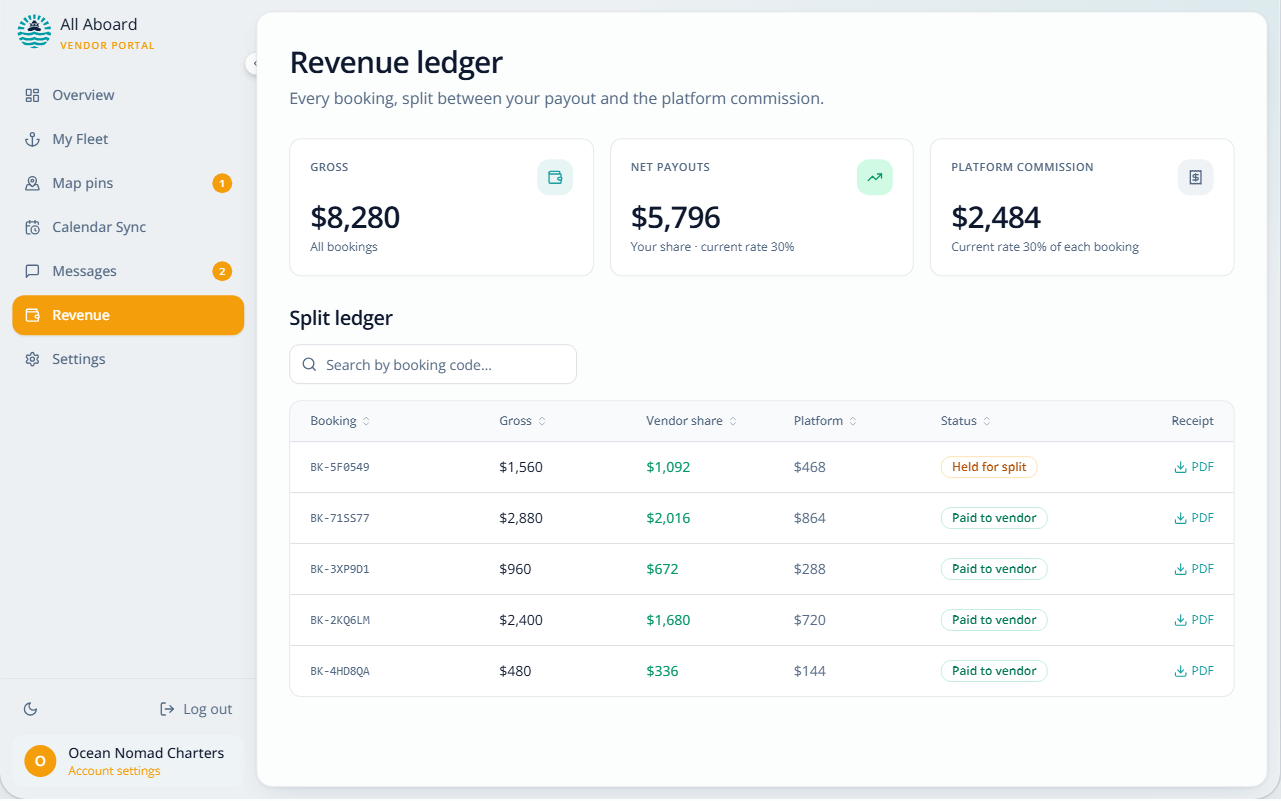
Revenue shows your gross, your net payouts and the platform commission.
Step 2: Read the split
Each booking shows its Gross, your Vendor share and the Platform commission, at the rate the platform sets for you.
Step 3: The platform commission
Platform is the commission kept on each booking, at the rate in effect when it was made. Everything else is your share.
Step 4: Know when you're paid
Once the guest's payment is verified, your share shows Held for split. All Aboard sends it to your payout account by 48 hours before departure, then it shows Paid to vendor and you get an email.
Step 5: Download receipts
Tap PDF on any row for that booking's payout receipt.