


For customers/Find a safari
Find a safari
Search every listed liveaboard, narrow the list with filters and sort by what's closest to you.
4 steps · 2 min read
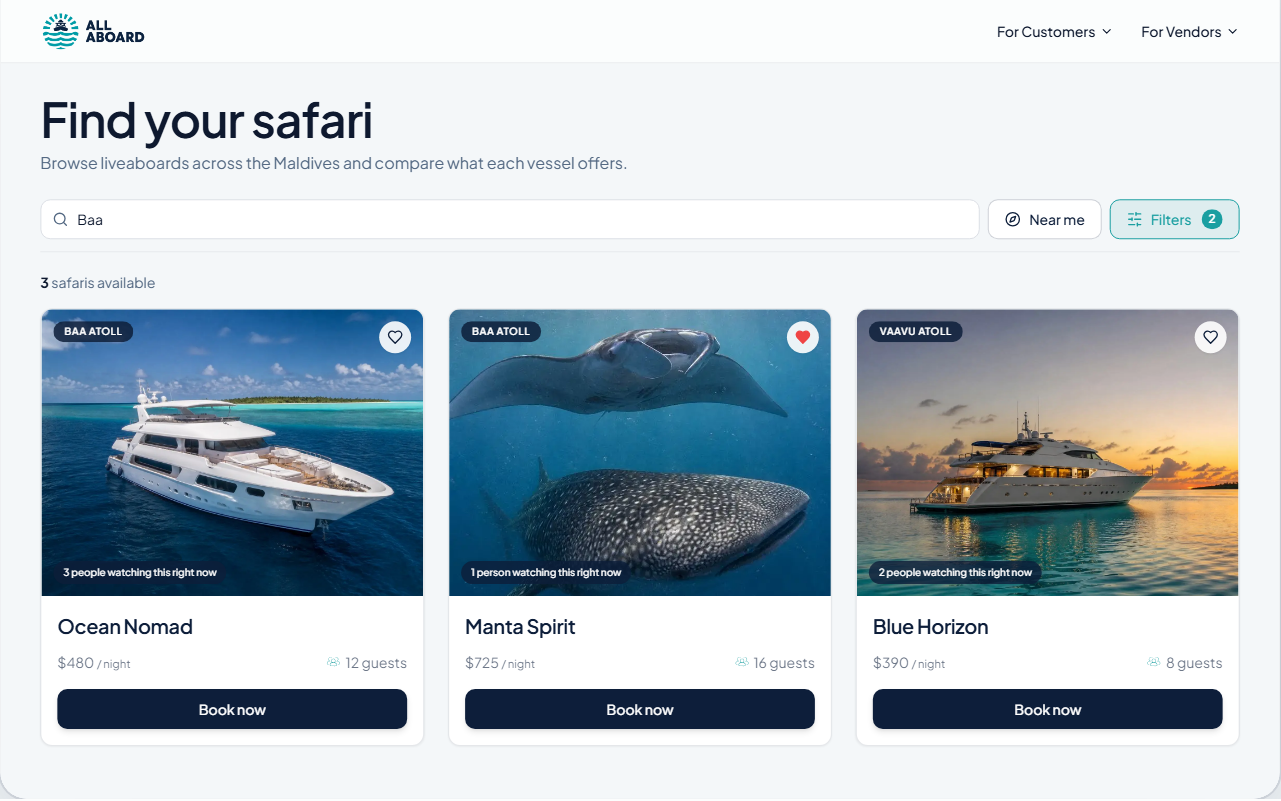
Preview with sample data · tap a number
Step 1: Search by name, atoll or route
Open Browse safaris, or tap View safaris on a destination on the home page. Type a boat name, an atoll such as Baa, or a route, and the list updates as you type.
Step 2: Narrow it down with Filters
Tap Filters to choose an atoll, a route package (Basic, Flex, Value or Gold), guests, a nightly price range and the amenities you need. The button shows how many safaris match before you apply.
Step 3: Sort by what's nearest
Tap Near me to sort safaris by distance from you. Your browser asks for permission once, and only after you tap it.
Step 4: Open a listing
Each card shows the home atoll, nightly price, guest capacity and how many people are looking right now. Tap the heart to save it to Favourites, or Book now to see the full listing.
Tip: Your search and filters are kept in the address bar, so you can bookmark or share the exact list you're looking at.