


For vendors/Handle bookings
Handle bookings
See each booking's trip, payment status and payout, and message the guest. Bookings confirm automatically once the guest's payment is verified.
5 steps · 3 min read
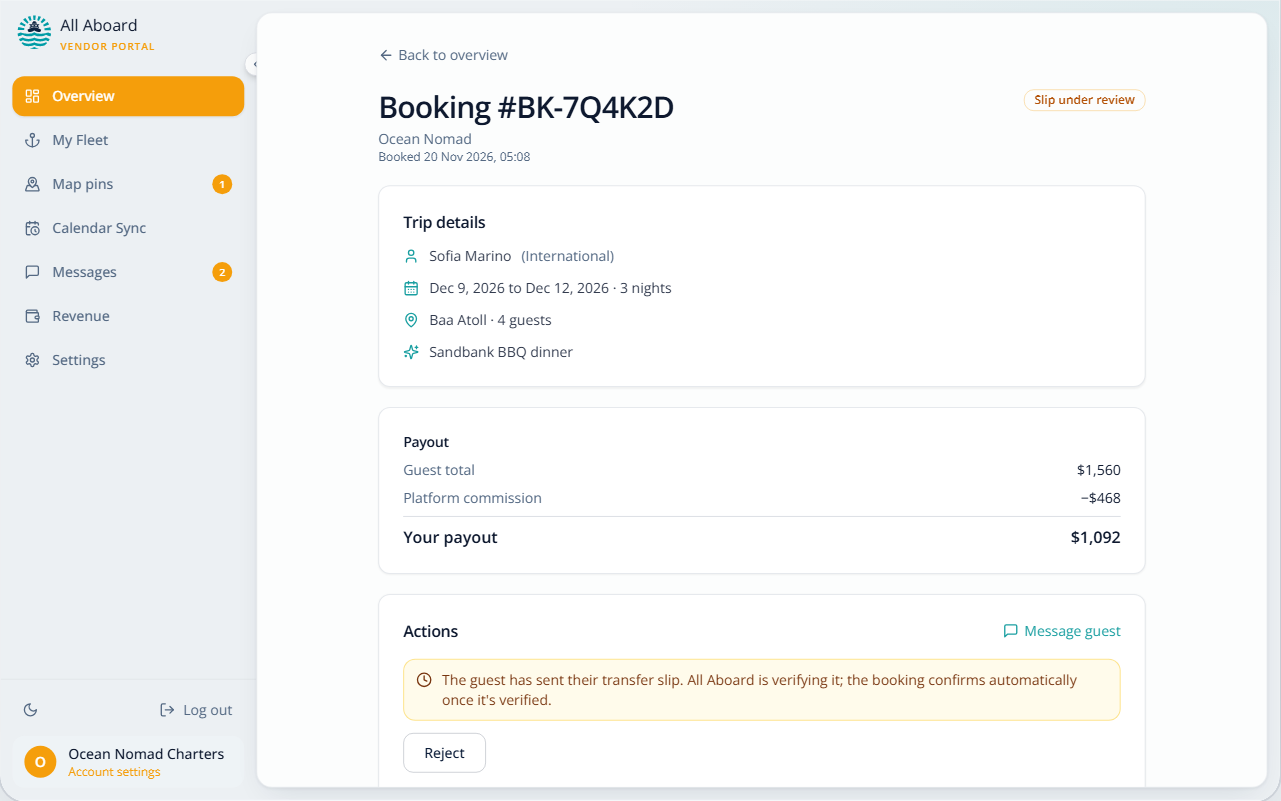
Preview with sample data · tap a number
Step 1: Open the request
New bookings appear under recent bookings on Overview and in Bookings. While the guest pays, you'll see Awaiting payment or Slip under review.
Step 2: Check the trip
Trip details shows the guest, dates and nights, atoll and guest count.
Step 3: See your payout
Payout breaks down the guest total, the platform commission and what you receive, in the currency the guest paid.
Step 4: Confirmation is automatic
When All Aboard verifies the guest's transfer, the booking confirms and the guest's voucher is emailed. Accept booking only appears after you've reopened a booking for edits. Reject declines a pending booking and can't be undone.
Step 5: Message the guest
Message guest opens the chat for this booking: pickup times, diets, anything else.
Tip: Confirmed bookings are locked. If a guest asks for a change within 30 minutes of booking, **Reopen for edits** appears here. To cancel a confirmed booking, use **Request cancellation**; All Aboard reviews it, and the guest gets a full refund when the operator cancels.