

For vendors/Register as an operator
Register as an operator
Create your account, upload the required certificates and accept the agreement. Our team reviews every application before your portal opens.
4 steps · 2 min read
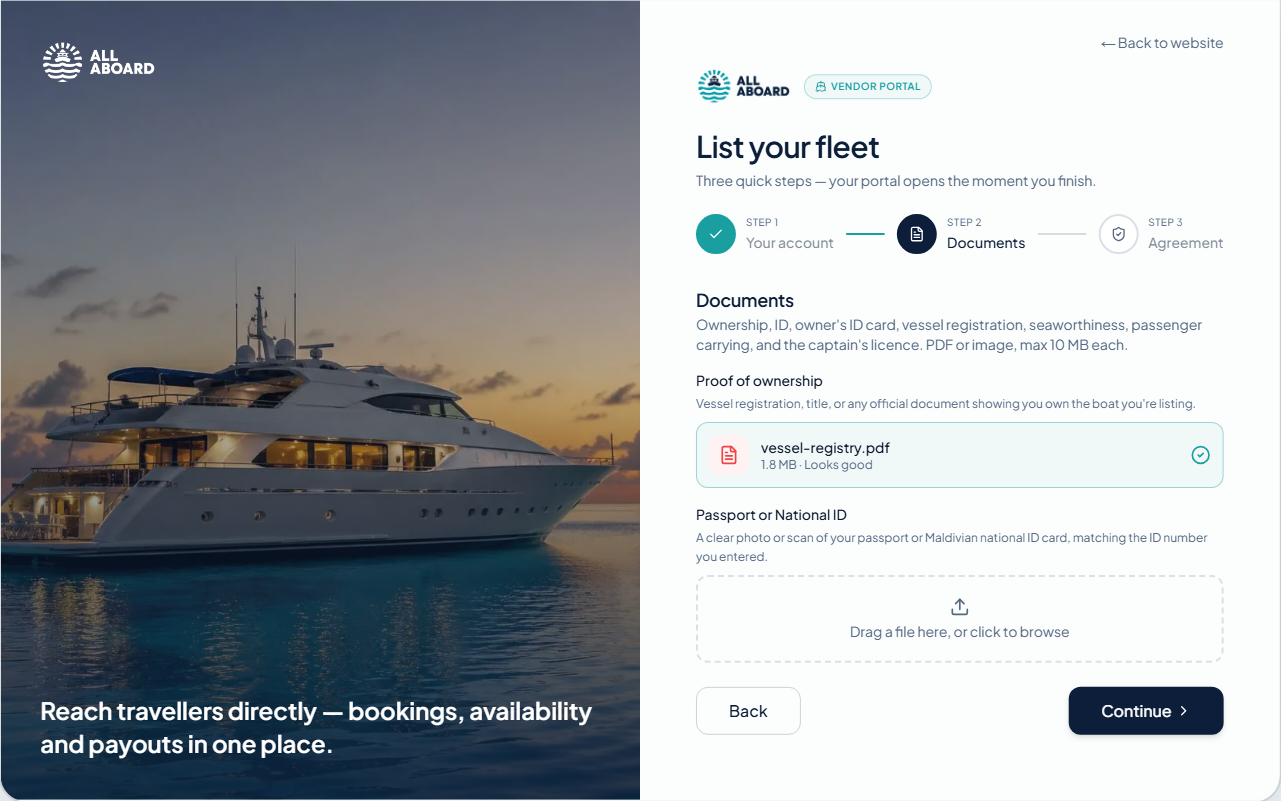
Preview with sample data · tap a number
Step 1: Create your account
On List your fleet, enter your name, NID or passport number (it must match the ID you upload), login email, phone and a password.
Step 2: Upload the required documents
Add proof of ownership, your ID, the owner's ID card, vessel registration, seaworthiness and passenger-carrying certificates, and the captain's licence. Each file is a PDF or image up to 10 MB. An admin can mark a document optional.
Step 3: Accept the agreement
Read the Commission & Calendar Agreement, tick to agree and tap Complete onboarding.
Step 4: Track your application
We review your documents by hand, usually within 3 to 5 business days, and email you at each step. Check progress any time from For Vendors → Check application status, and re-upload anything that needs fixing there. Once approved, your portal opens and listing is free.
Tip: Signed out, or on another device? **Check your application status** emails you a one-time link, no password needed. Documents are encrypted at rest and only compliance reviewers can see them.