

For vendors/Availability and calendar sync
Availability and calendar sync
Bookings block dates automatically. Block your own dates, and connect Google, Airbnb, Booking.com or your own booking system so nothing is sold twice.
5 steps · 3 min read
Preview with sample data · tap a number
Step 1: Pick a vessel
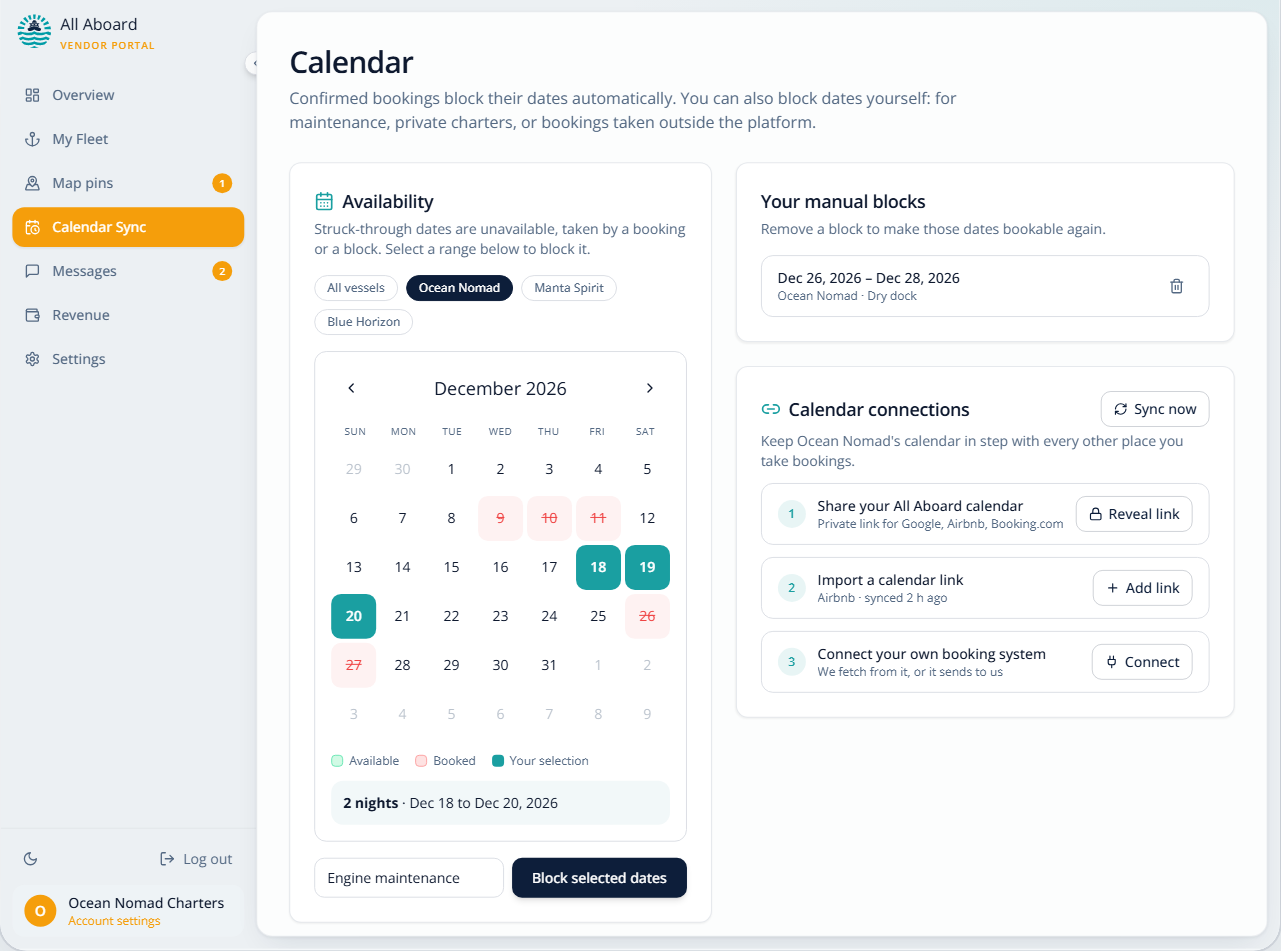
In Calendar Sync, choose a vessel or All vessels. Struck-through dates are already taken by a booking or a block.
Step 2: Block dates yourself
Select a date or range, add a reason such as engine maintenance, then tap Block selected dates. They disappear from search.
Step 3: Review your manual blocks
Your manual blocks lists each block. Unblock these dates makes them bookable again.
Step 4: Connect your other calendars
Under Calendar connections, Share your All Aboard calendar gives other sites a private link (tap Reveal link and confirm with an emailed code). Import a calendar link brings their .ics link in; we check it every 6 hours, or tap Sync now.
Step 5: Connect your own booking system
Run your own booking app? Connect your own booking system either fetches its availability from an address you give us, or gives you an All Aboard API key so your system sends bookings to us instantly.