

For customers/Pay and get your voucher
Pay and get your voucher
Pay for a held booking by bank transfer, upload your slip, and get your boarding voucher by email once we've checked it.
4 steps · 2 min read
Preview with sample data · tap a number
Step 1: Pay from your held booking
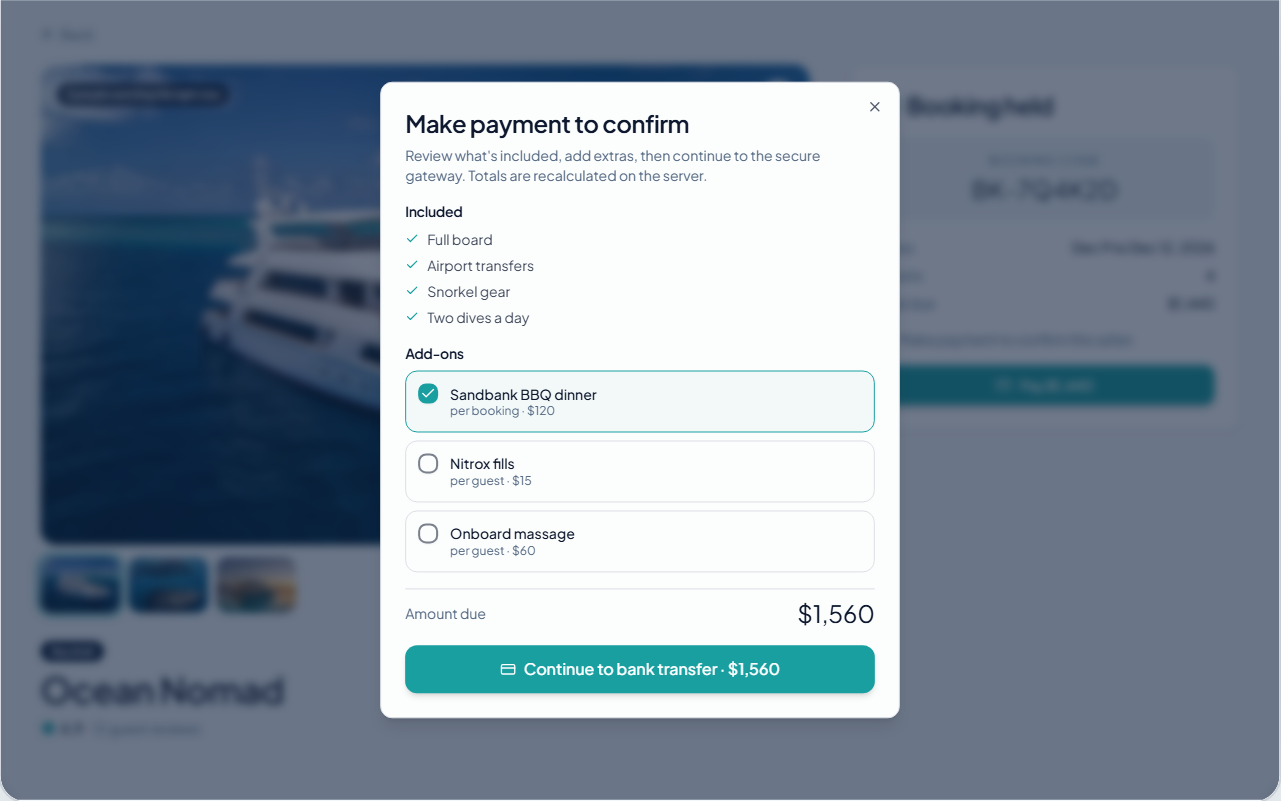
After you reserve, the Booking held card shows your booking code, dates and total due. Tap Pay within 30 minutes, or pay from My Bookings.
Step 2: Check what's included
Make payment to confirm lists what's already in the rate, such as meals, transfers or gear.
Step 3: Add optional extras
Tick any paid Add-ons, priced per booking, per guest or per night. Amount due updates as you choose.
Step 4: Transfer and upload your slip
Tap Continue to bank transfer. Send the exact amount to the All Aboard account shown, with your booking code in the remarks, then upload the slip with its reference. Maldives residents pay in MVR; international guests can choose USD or MVR.
Tip: Once your slip is in, the booking shows **Slip under review** and your dates stay held. We confirm it as soon as the money reaches our account, and your voucher is emailed straight away. You only ever pay All Aboard, never the operator directly.