


For customers/Manage your booking
Manage your booking
Track every trip in My Bookings, pay for a held booking, request changes or a cancellation, and message your operator.
4 steps · 2 min read
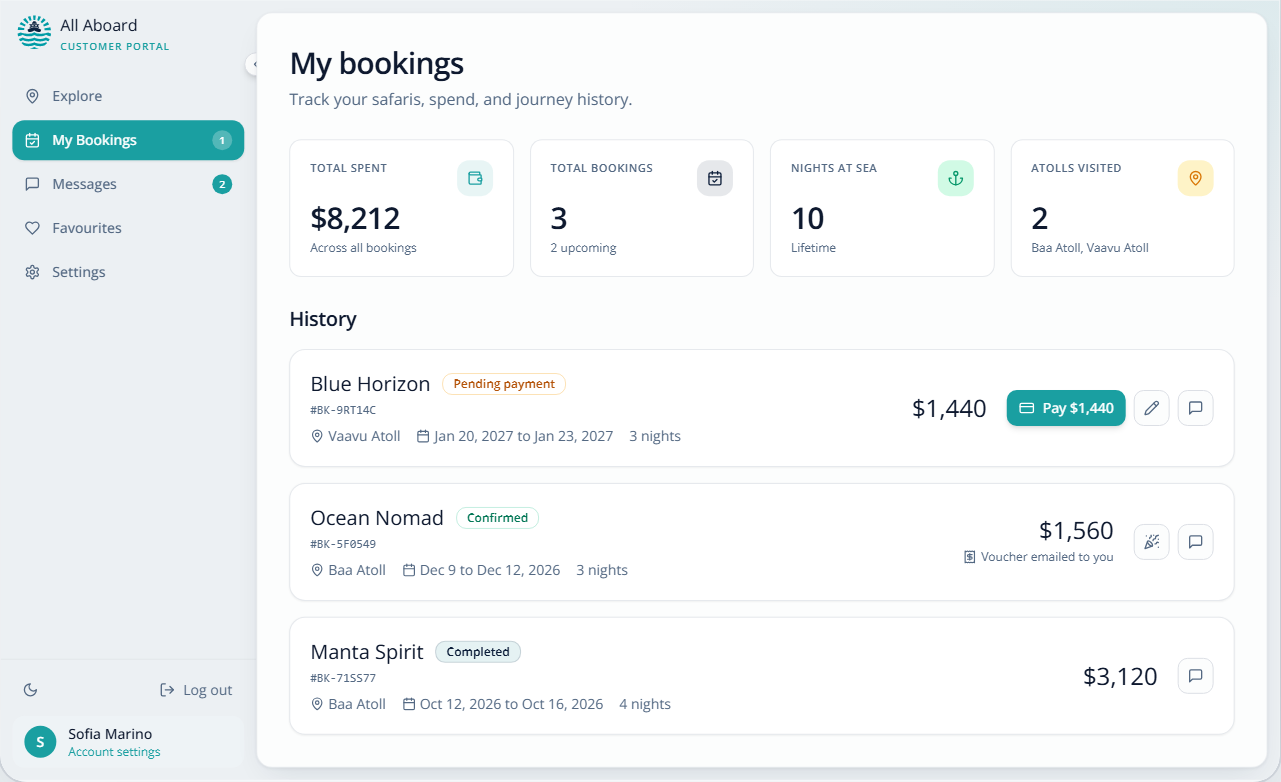
Preview with sample data · tap a number
Step 1: Open My Bookings
My Bookings shows your total spend, bookings, nights at sea and atolls visited, with every trip listed under History.
Step 2: Pay for a held booking
A booking marked Pending payment is holding your dates. Tap Pay to transfer and upload your slip. Its payment status moves from Awaiting payment to Slip under review, then the booking is confirmed.
Step 3: Change dates, guests or add-ons
Before you pay, the pencil button (Edit booking) changes dates, guests or add-ons. Once confirmed, you can ask for a change within 30 minutes of booking with Request edit in the chat. After that the booking is locked.
Step 4: Add an occasion, message the crew
On a confirmed trip, Add occasion note tells the crew what you're celebrating, and the chat button lets you Message operator about pickup, diets or timing.
Tip: Plans changed? Use **Request cancellation** on the booking. We review every request; the platform fee isn't refunded when you cancel, but you get a full refund if the operator cancels. See the Cancellation Policy for details.