


For customers/Book your dates
Book your dates
Pick overnight or day-trip dates, add your guests and a route, check the total and reserve. Your dates are held for 30 minutes while you pay.
4 steps · 2 min read
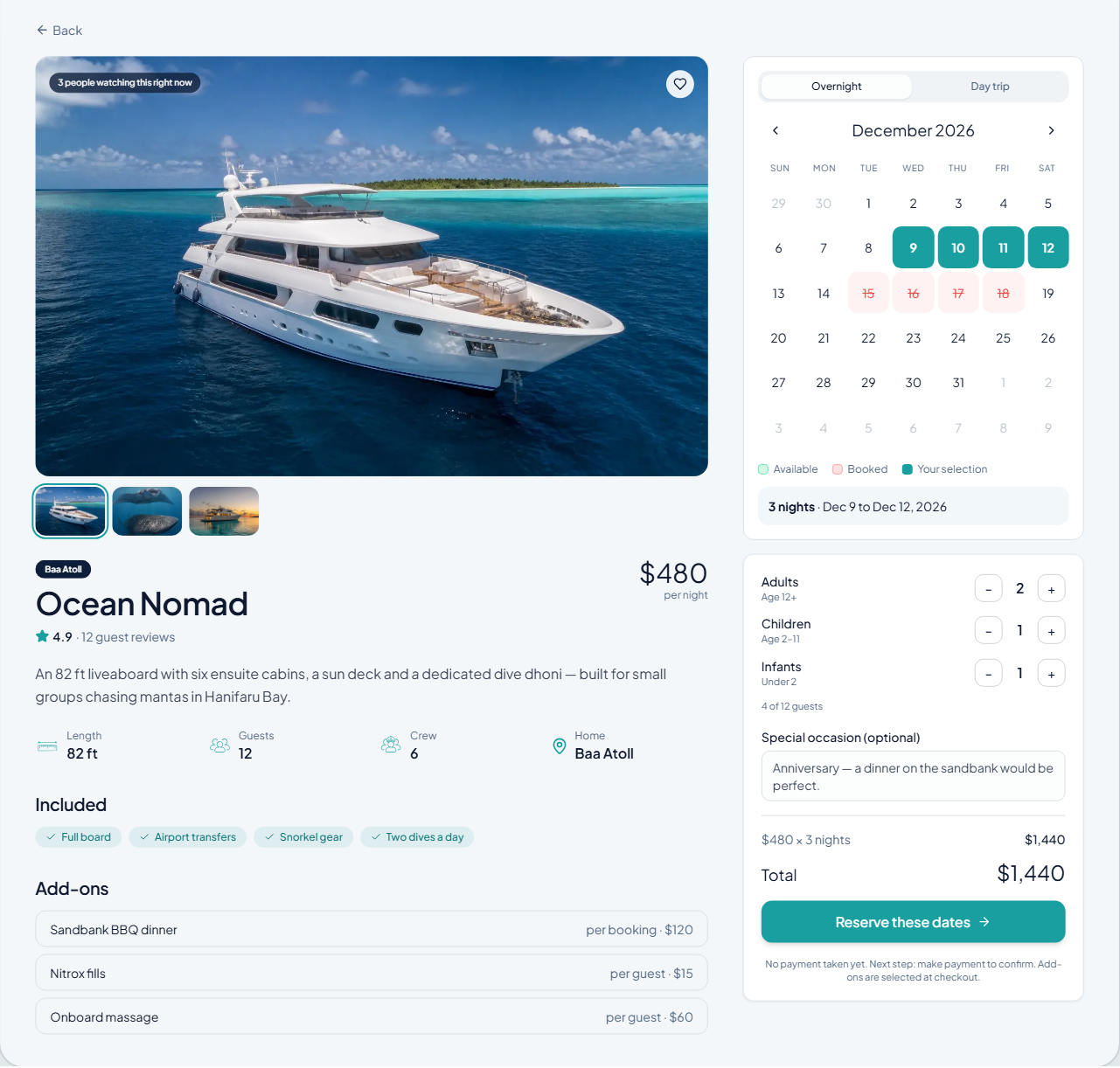
Preview with sample data · tap a number
Step 1: Choose overnight or day trip
On the listing, pick Overnight for one or more nights, or Day trip for a single day, then set start and end times.
Step 2: Pick your dates
Struck-through dates are already booked. Tap your first day, then your last, and the card confirms how many nights you've chosen.
Step 3: Add guests and any occasion
Set adults, children and infants. The boat's limit counts everyone. Celebrating something? Add it under Special occasion so the crew can prepare.
Step 4: Check the total, then reserve
The card shows the nightly rate × nights and your Total. Tap Reserve these dates to hold them for 30 minutes while you pay by bank transfer. No money is taken yet.
Tip: If the operator has published routes, pick one while booking and it's drawn on the map. Came from a search with dates and guests? They're carried over. If you're not signed in, you'll log in first and come straight back.